Ask ten people whether HTML or WordPress is better for building a website and you’ll probably get ten different answers. Developers swear by custom HTML and frameworks, while most non‑technical business owners hear “Just use WordPress, it’s easy.” Somewhere between those extremes is the real answer that matters for your business.
At GoPixel Web Developers in Lucknow, we build both WordPress and custom HTML/stack‑based sites for clients in Hazratganj, Gomti Nagar, Aliganj and Jankipuram. The choice isn’t about which technology is “cooler”; it’s about which approach gives you the right balance of control, speed, flexibility and cost in 2026.
What “HTML” and “WordPress” Really Mean
Before we compare, it’s important to clarify terms. When business owners say “HTML website”, they usually mean a site coded directly in HTML/CSS (and maybe JavaScript) without a heavy CMS. When they say “WordPress website”, they usually mean a site powered by the WordPress CMS with a theme and plugins.
Pages are hand‑crafted (or generated) using HTML, CSS and JavaScript, often with a modern framework underneath. Content changes usually require a developer or a build process.
- Very lean and fast when built well.
- Maximum control over markup and performance.
- Content changes may need a developer or Git workflow.
WordPress is a content management system. You manage pages, posts and media through an admin dashboard. Themes control design and plugins add functionality.
- Non‑technical users can edit content easily.
- Huge ecosystem of themes and plugins.
- Needs proper hosting, updates and security care.
Quick Answer: HTML vs WordPress in One Line
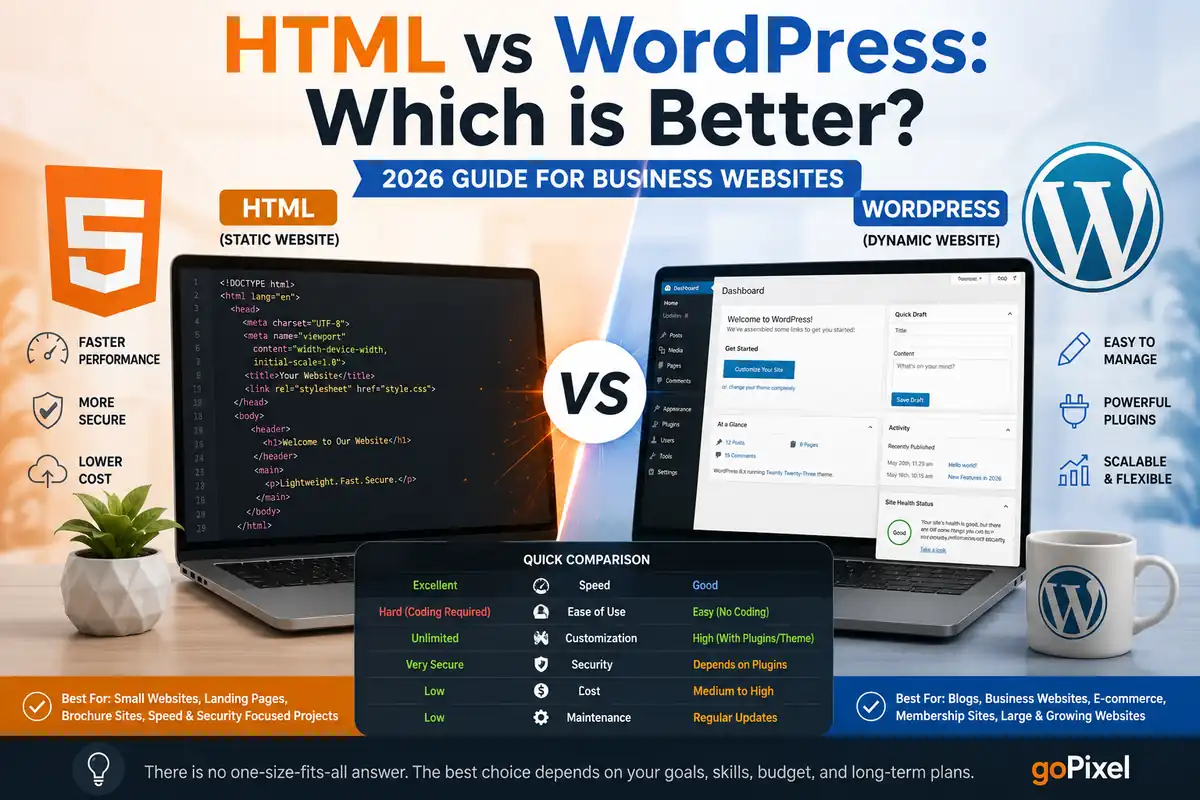
If you want maximum control, speed and are comfortable involving a developer for changes, HTML or a custom stack is better. If you want to update content yourself, use themes/plugins and move faster without deep coding, WordPress is usually better.
For most small businesses in Lucknow in 2026—clinics, coaching centres, studios, agencies—WordPress tends to win because of the balance between flexibility, cost and ease of use. HTML shines when performance, simplicity and custom control are the top priorities, and when you have technical support in place.
Core Differences That Affect Your Business
Let’s compare HTML vs WordPress on the factors that actually impact a business owner: speed, control, content changes, security and long‑term cost.
HTML / Custom‑Coded
- Speed: Usually faster out of the box because there is no CMS overhead or unnecessary plugins.
- Control: Every line of markup and CSS can be tailored to your design and performance goals.
- Security: Smaller attack surface if you keep things simple and avoid unnecessary dynamic features.
- Hosting: Can run on very simple, cheap static hosting and CDNs.
WordPress
- Ease of editing: You (or your team) can add/edit pages and blog posts without a developer.
- SEO & content: Built‑in blogging plus plugins make SEO/content marketing easier to manage.
- Features via plugins: Forms, SEO, caching, ecommerce, memberships and more with minimal coding.
- Community & support: Huge global ecosystem of tutorials, plugins, themes and developers.
Both can be fast, secure and SEO‑friendly—if they’re implemented correctly. The decision is more about who will maintain the site and how often it needs to evolve.
HTML Website: Pros and Cons
When we say “HTML website”, think of a lean, static or custom‑coded site for a business that doesn’t change pages every other day. Here’s what you gain and what you give up.
HTML Pros
- Performance: Static pages with minimal dependencies can achieve excellent Core Web Vitals and fast load times, even on budget phones and 4G connections in areas like Jankipuram.
- Clean code: No random shortcode markup or plugin bloat. Easier to keep things tidy for developers.
- Security: Fewer moving parts and no default admin panel means fewer common attack vectors.
- Hosting flexibility: Can run from simple object storage, static hosts or any basic web server.
HTML Cons
- Content changes need a workflow: Edits usually require a dev or a Git/CI workflow. Not ideal if you want to publish content weekly without tech help.
- Fewer plug‑and‑play add‑ons: You don’t have an equivalent of the WordPress plugin directory for adding forms, SEO tools or ecommerce in one click.
- Higher dev dependency: Great if you already work closely with a developer or agency; challenging if you don’t.
WordPress Website: Pros and Cons
WordPress powers a huge share of the web, and for good reason. But it’s not magic. Used wisely, it’s powerful; used blindly, it can be a maintenance mess.
WordPress Pros
- Content control: You can log into the dashboard, edit pages, publish blog posts and manage media without touching code.
- SEO‑friendly structure: Permalinks, categories, tags and plugins like Rank Math or Yoast make it straightforward to implement on‑page SEO.
- Plugins for everything: Forms, caching, security, ecommerce, page builders, memberships, LMS—most needs have mature plugins.
- Theme ecosystem: Hundreds of high‑quality themes and starter templates to speed up design and layout.
WordPress Cons
- Potential bloat: Too many plugins, heavy page builders and poor hosting can slow things down quickly.
- Maintenance overhead: Needs ongoing updates for WordPress core, themes and plugins, plus backups and security monitoring.
- Security risks if neglected: Outdated plugins or weak admin practices are a common source of hacks.
- Quality varies: Not all themes/plugins are well‑coded; choosing the wrong stack leads to problems later.
When HTML Makes More Sense (Real‑World Scenarios)
Based on GoPixel projects across Lucknow, these are situations where we often recommend an HTML or custom‑stack site over WordPress:
- Ultra‑lean brochure sites: A five‑page site for a small but high‑value service business that rarely changes content, where speed and simplicity matter more than frequent updates.
- Marketing landing pages: Campaign‑specific, highly optimised landing pages where you want absolute control over markup and performance.
- When you have a dev team: Startups or tech‑savvy founders who already have developers and are comfortable with Git‑based workflows.
- Security‑sensitive static sites: Where you intentionally want to reduce the surface exposed by a CMS admin panel.
For example, a specialised B2B service in a Lucknow industrial area that works only with a handful of large clients might be perfectly happy with a custom HTML site and occasional developer‑led updates.
When WordPress is the Smarter Choice
In day‑to‑day consulting, WordPress is our default recommendation for many SMEs in Hazratganj, Gomti Nagar, Aliganj and Jankipuram because it aligns with how non‑technical teams actually work.
- Content marketing matters: If blogging, case studies and SEO‑driven content are part of your growth plan, WordPress makes publishing far easier.
- You want to manage the site internally: Your team wants the ability to add pages, tweak copy or post updates without waiting for a developer.
- You need standard features quickly: Contact forms, lead capture, basic ecommerce, bookings—WordPress does this efficiently with quality plugins.
- You value time‑to‑market: You’d rather launch in weeks with a strong base than spend months on custom infrastructure.
Think of coaching institutes, clinics, salons, photographers, local brands and agencies in Lucknow—most of them are better served by a well‑implemented WordPress site than a fully custom codebase they can’t maintain.
Hybrid Approach: Static Frontend + WordPress or Headless
You don’t always have to choose purely HTML or purely WordPress. Many modern setups use a hybrid approach: WordPress as a content backend, and a static or framework‑based frontend that pulls data via APIs.
This can give you:
- The editorial convenience of WordPress for your content team.
- The performance and deployment benefits of a static/frontend framework.
- More control over how and where content is rendered (for example, a marketing site plus a separate app).
For growing Lucknow brands, GoPixel sometimes recommends starting with a classic WordPress site and then progressively decoupling parts of the frontend if and when the project scales beyond normal website needs.
4‑Step Decision Framework for HTML vs WordPress
If you’re still unsure, use this simple framework as a sanity check before committing to one stack.
🚫 Common Mistakes to Avoid
- Choosing WordPress only because it’s popular — without planning how you’ll manage updates, security and plugin choices.
- Choosing HTML only to “avoid CMS headaches” — then getting stuck every time you want to change a small piece of content.
- Copying someone else’s stack blindly — your cousin’s ecommerce setup or a big brand’s tech may not fit your stage or team.
How GoPixel Web Developers Helps You Choose the Right Stack
Because we operate as a web design and digital partner in Lucknow, we’re not married to either HTML or WordPress. Our job is to understand your business, team and growth plans, then recommend the stack that will actually work for you in 2026—not just look good in a proposal.
When a business approaches GoPixel to build or rebuild a website, we usually:
- Map your services, target audience and local markets (like Gomti Nagar, Hazratganj, Aliganj, Jankipuram).
- Clarify how often you expect to change content and who will manage it.
- Evaluate whether your feature list is standard (good for WordPress) or more custom (better for HTML/custom stack).
- Prepare a clear plan that explains which stack we recommend and why—covering speed, SEO, maintenance and cost.
Sometimes that means a clean, fast WordPress site with a lightweight theme and minimal plugins. Other times it means a static or custom‑coded site that focuses on performance and simplicity. In a few cases, it means a hybrid approach to balance control and convenience.
Frequently Asked Questions
Which is better for a small business website in India: HTML or WordPress?
For most small businesses in India, WordPress is better because it offers an easier content management experience, a large theme and plugin ecosystem, and lower long-term maintenance effort compared to pure custom HTML. HTML is a better choice when you need a very fast, lightweight site with minimal content updates and you have a developer to manage changes.
Is an HTML website faster than WordPress?
A well-built static HTML website is usually faster than a typical WordPress site because it serves pre-generated pages without database queries or heavy plugins. However, a properly optimised WordPress site with good hosting, caching and a lean theme can achieve very competitive performance for most business use cases.
Is WordPress still good in 2026 for business websites?
Yes, WordPress is still a solid choice in 2026 for business websites, especially for blogs, service sites and small ecommerce stores. Its ecosystem, editor improvements and plugin library make it practical for non-technical teams, provided you use quality hosting, a lightweight theme and keep plugins under control.
When should I avoid WordPress and choose HTML or a custom stack?
You should consider HTML or a custom stack instead of WordPress when you need very specific functionality, want a highly optimised static site with minimal CMS overhead, or are building something closer to a web application with complex logic and custom user flows. In those cases, a framework-based approach often provides more control.
Can I start with WordPress and move to custom HTML or a framework later?
Yes. Many businesses start with WordPress to validate content, structure and SEO, then gradually move parts of the site to static HTML or a modern framework as their requirements grow. Planning content and URLs carefully from the beginning makes any future migration easier.

Still Confused Between HTML and WordPress for Your Website?
Share your goals, features and budget with GoPixel Web Developers, and we’ll recommend a tech stack that fits your reality—not just a trend. Whether you’re in Hazratganj, Gomti Nagar, Aliganj, Jankipuram or beyond, we can help you choose and build the right website for 2026.
Get a Free Website Stack Consultation →