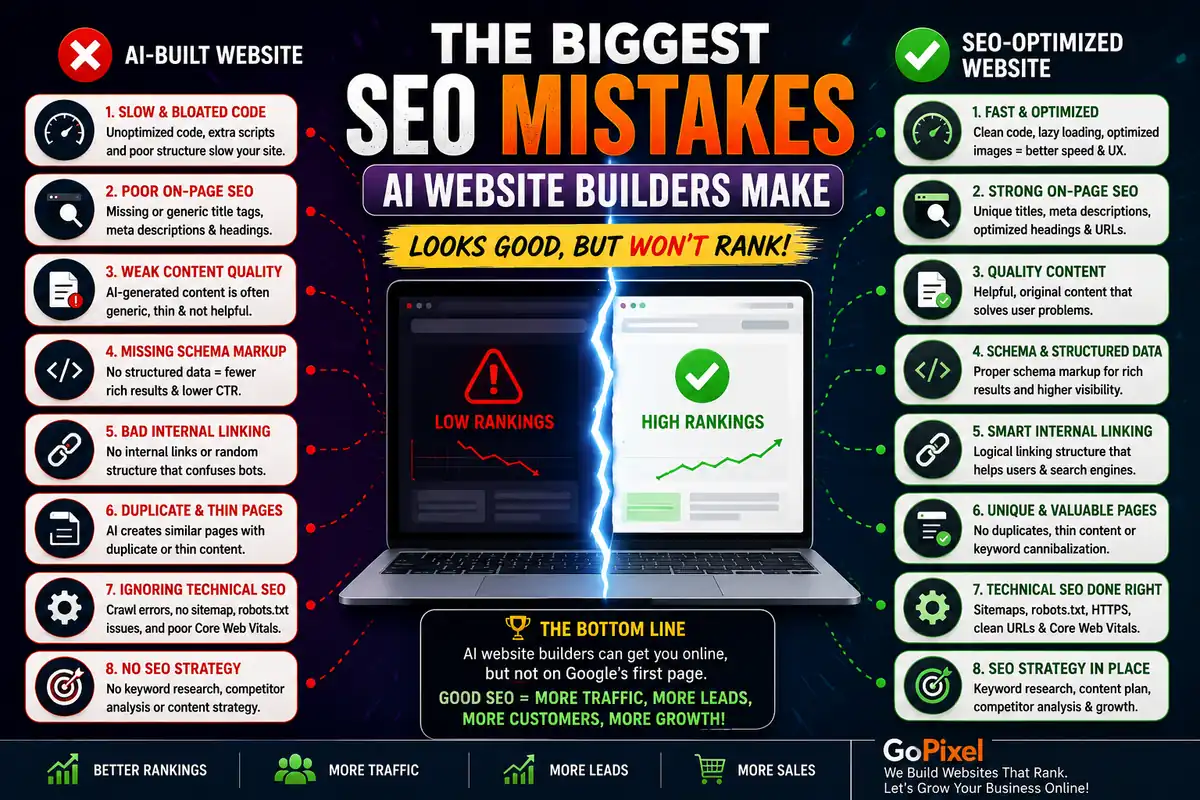
AI website builders have one major blind spot: SEO. They can generate a page that looks reasonable on screen, but they cannot generate one that is optimised for search engines. The two goals — visual appeal and search performance — require different priorities, and AI models are trained to optimise for the former at the expense of the latter.
I have audited AI-generated websites for businesses in Gomti Nagar, Hazratganj, Aliganj, and across Lucknow. The SEO issues are remarkably consistent regardless of which AI tool was used. This article covers the most common mistakes and how to fix them. If you are evaluating AI builders for a business site, start with our broader guide on AI website builders vs professional development.
Last updated:
93% of online experiences begin with a search engine. Websites that appear on the first page of Google capture 91.5% of all organic traffic. AI-generated sites consistently score 30-50% lower on SEO audits compared to professionally built sites.
Sources: First Page Sage, Backlinko, HTTP Archive.
| SEO Factor | AI Builder | Professional Build |
|---|---|---|
| Page Speed | ⚠️ | ✅ |
| Schema Markup | ⚠️ | ✅ |
| Internal Links | ⚠️ | ✅ |
| Meta Tags | ⚠️ | ✅ |
| Scalability | ⚠️ | ✅ |
Mistake 1: Bloated Code That Kills Page Speed
AI generates far more code than a page needs.
Unused CSS, redundant JavaScript, and deeply nested HTML directly hurt Core Web Vitals.
Page speed is a confirmed Google ranking factor. It also directly affects user experience — a one-second delay in page load time reduces conversions by up to 20%. AI website builders consistently produce bloated code that fails speed benchmarks.
When you prompt an AI to "build a landing page," it generates a complete HTML document with included CSS frameworks, JavaScript libraries, and styling for elements that may never appear on the page. A human developer writes only the code needed. The AI writes code for every possibility it was trained on.
Common speed issues in AI-generated sites:
- Entire CSS frameworks included but only 10% used
- JavaScript libraries loaded on every page regardless of need
- Deeply nested HTML structures that increase DOM size
- No code minification or tree-shaking
- No browser caching configuration
Fix: Run your site through Google PageSpeed Insights. Fix every issue rated medium or high. Remove unused CSS and JavaScript. Minify remaining code. Set up browser caching. If the code is too bloated to clean efficiently, consider a professional rebuild.
Mistake 2: Broken or Missing Heading Hierarchy
AI does not understand semantic heading structure.
Multiple h1 tags, skipped heading levels, and headings used for styling are all common.
Heading hierarchy is one of the most fundamental SEO signals. It tells Google which content is most important on a page. A proper structure has exactly one h1 tag (the page title), followed by h2 tags for major sections, h3 tags for subsections, and so on.
AI-generated sites routinely break this structure. I have seen pages with three h1 tags, pages that jump from h1 to h4 with nothing in between, and pages where headings are used purely for visual styling rather than semantic structure.
This confuses search engines and makes it harder for your content to rank for the right queries.
Fix: Open every page of your site and check the heading structure. Use the HeadingsMap browser extension to visualise the hierarchy. Ensure exactly one h1 per page and a logical descending structure. Never use heading tags for visual styling — that is what CSS is for.
Mistake 3: No Schema Markup
AI builders never generate structured data automatically.
Without schema, Google has a harder time understanding and displaying your content in rich results.
Schema markup (structured data) helps search engines understand the context of your content. A local business schema tells Google your address, phone number, and hours. An article schema tells Google your publication date, author, and headline. FAQ schema can get your questions displayed directly in search results.
AI website builders generate none of this. The output is plain HTML with no structured data. This is a significant missed opportunity, especially for local businesses that could appear in the local pack with proper LocalBusiness schema.
We include proper schema markup in every site we build — it is part of our 10-step SEO system.
Fix: Use Google's Rich Results Test to check if your site has any structured data. Add JSON-LD schema markup for your business type — LocalBusiness for local services, Article for blog posts, Product for e-commerce, FAQPage for frequently asked questions.
Mistake 4: Poor Internal Linking
AI generates standalone pages with no connection to each other.
Without internal links, Google cannot discover related pages or understand site structure.
Internal linking serves two purposes: it helps search engines discover all the pages on your site, and it distributes "link equity" (ranking power) from high-authority pages to newer or deeper pages. A well-linked site has every page connected to relevant others through contextual links.
AI builders generate pages in isolation. The "Home" page has no link to the "Services" page unless you explicitly prompt it. Even then, the links are placed without strategic thought — no consideration for which pages should pass authority to which.
The result is a collection of orphaned pages that Google struggles to index and rank.
Fix: Map out your site structure and add contextual links between related pages. Every service page should link to relevant blog posts. Every blog post should link to relevant service pages. Your homepage should link to your most important pages. Add breadcrumb navigation to help users and search engines understand hierarchy.
Mistake 5: Generic or Missing Meta Tags
Meta titles and descriptions are either missing, duplicated, or auto-generated.
Google relies on meta tags to understand what each page is about and display it in search results.
Every page on your site needs a unique meta title and meta description. The meta title is the clickable headline in search results. The meta description is the summary text beneath it. Both influence whether users click on your result instead of a competitor's.
AI builders often generate generic meta tags like "Home | My Website" or "Services | My Website" — or skip them entirely. Some tools auto-generate descriptions by pulling the first sentence of content, which rarely makes a compelling search snippet.
Worse, AI-generated meta tags frequently exceed the recommended character limits (60 characters for titles, 160 for descriptions), causing them to be truncated in search results.
Fix: Write a unique meta title and description for every page. Keep titles under 60 characters and descriptions under 160. Include your primary keyword naturally. Make descriptions compelling — they are your sales pitch in search results. Use Google Search Console to identify pages with missing or duplicated meta tags.
Mistake 6: Unoptimised Images
AI tools add images without optimising them for the web.
Large file sizes, missing alt text, and no lazy loading hurt both speed and accessibility.
Images are often the heaviest elements on a page. AI website builders generate or include images without any optimisation — full-resolution files, no compression, no WebP conversion, no dimension attributes, no lazy loading, and no descriptive alt text.
Each of these omissions hurts SEO. Large images slow down page load, which increases bounce rates and lowers rankings. Missing alt text means Google cannot understand what the image depicts. Missing dimensions cause layout shifts that hurt Cumulative Layout Shift (CLS), one of the Core Web Vitals metrics.
Fix: Convert all images to WebP format. Compress them to reduce file size by 60-80% without visible quality loss. Set explicit width and height attributes to prevent layout shifts. Add descriptive alt text to every image. Implement lazy loading for below-the-fold images using loading="lazy".
Mistake 7: Thin or Duplicated Content
AI generates generic text that adds no unique value.
Google rewards original, helpful content. AI-generated filler text does the opposite.
Google's algorithms are better than ever at detecting thin, auto-generated, or low-value content. The Helpful Content Update specifically targets sites that publish content primarily for search engines rather than people.
AI website builders generate content that reads as generic because it is trained on common patterns. The "About" page says something generic like "We are passionate about delivering quality solutions to our clients." The "Services" page lists features without explaining real benefits. Multiple pages may contain similar or identical phrasing.
This is not just an SEO problem — it is a trust problem. Visitors can sense generic content, and it undermines their confidence in your business.
Fix: Rewrite every page of AI-generated content with original, specific information about your business. Include real examples, data, customer stories, and your unique perspective. Google's quality raters guidelines explicitly favour content that demonstrates first-hand experience and expertise — something AI cannot replicate.
Mistake 8: No Sitemap or Search Console Setup
AI builders create the site but not the infrastructure Google needs to find it.
Without a sitemap and Search Console, Google may never index your pages properly.
An XML sitemap is a roadmap that tells Google which pages exist on your site and how often they change. Google Search Console is the tool that shows you how Google sees your site — which pages are indexed, which have errors, and how your site appears in search results.
AI website builders do not generate sitemaps. They do not integrate with Search Console. They do not submit your site for indexing. After the AI generates the pages, the SEO work that happens next is entirely your responsibility — and most business owners do not know it exists.
I have audited AI-built sites that were live for six months with zero organic traffic because Google had never crawled them properly.
Fix: Generate an XML sitemap using a free online tool or a plugin if your AI builder supports it. Submit it through Google Search Console. Verify site ownership. Monitor the Index coverage report weekly to catch crawl errors early.
How to Fix AI SEO Issues
The eight mistakes above cover the most common SEO problems in AI-generated sites. Here is a prioritised checklist to fix them:
- Run PageSpeed Insights and resolve every performance issue
- Fix heading hierarchy — one h1 per page, logical h2-h6 structure
- Add JSON-LD schema markup for your business type
- Write unique meta titles and descriptions for every page
- Build a contextual internal linking structure
- Optimise all images — WebP, compression, alt text, lazy loading
- Rewrite AI-generated content with original, specific information
- Generate and submit an XML sitemap to Google Search Console
- Monitor Search Console weekly for crawl errors and index coverage
If this list feels overwhelming, that is because SEO is genuinely complex. AI tools can help with parts of it — generating content drafts, suggesting keywords, identifying technical issues — but they cannot replace the strategic thinking of an experienced SEO professional. For a complete walkthrough of SEO fundamentals, read our complete SEO guide for beginners.
Want to know how your site's SEO really looks?
I will run a full SEO audit on your AI-built site and give you a prioritised list of fixes, ranked by impact.
Get Your Free SEO AuditFrequently Asked Questions
Why do AI-generated websites struggle with SEO?
AI models generate code based on patterns, not SEO best practices. They prioritise visual output over performance, semantics, and structure. The result is bloated code, missing meta tags, poor heading hierarchy, and no schema markup — all of which hurt rankings.
Can an AI-generated site rank on Google?
It can, but only after significant manual SEO work. The raw output of an AI builder will not rank well because it fails on page speed, heading structure, schema, and content quality. With thorough optimisation, some AI sites can achieve reasonable rankings, but they will almost always underperform a professionally built site.
Which SEO factor do AI builders handle worst?
Page speed and code bloat are the worst offenders. AI generates far more CSS and JavaScript than necessary, includes unused code, and rarely optimises images. These issues directly impact Core Web Vitals, which are ranking factors.
Can I add schema markup to an AI-built site?
Yes, you can add JSON-LD schema markup manually in the head section of any HTML page. AI builders do not generate schema automatically, but you can insert it yourself or use a plugin if the builder supports custom code injection.
Should I rebuild my AI site or fix the SEO?
If the codebase is not too bloated and the structure is mostly sound, fixing the SEO issues may be enough. But if the AI-generated code is fragile, inconsistent, or fundamentally broken, rebuilding with a professional developer is almost always faster and more cost-effective.
Ready for SEO that actually works?
Whether you are fixing an AI-built site or starting fresh, we build websites that rank from day one.
Start Your Project